
Have you replaced your tire pressure monitoring sensors (TPMS) because you’ve changed the tire, or your old TPMS sensors were not reporting correct data?
Then you need to relearn all four tire pressure monitoring sensors with the ECU, and you need an OBD2 scanner with relearn to do that.
You have to pair your new TPMS sensors with your car computer to report the correct air pressure of the tiers.
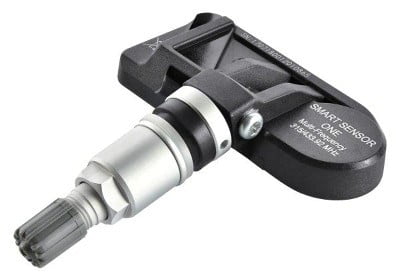
The stock TPMS sensors have a unique ID that already comes paired with your car ECU.
You can replace your stock sensor with third-party OEM/Universal sensors available on Amazon and other online stores.
Here’s What We Cover:

All professional-grade OBD2 scanners have a built-in feature for TPMS relearn, but those sensors are costly and it’s not worth for DIY work.
Picking the best OBD2 scanner with relearn function isn’t an easy task. Hence, we’ve listed some top-rated OBD2 scanners with TPMS relearn.
What’s The Best OBD2 Scanner with Relearn?

If you’ve replaced your tire pressure monitoring sensors (TPMS), then you need an obd2 scanner with relearn feature to pair with your car ECU electronically.

Here is the top-rated car scanner with TPMS relearn feature:
1. LAUNCH CRT5011E TPMS Relearn Tool

LAUNCH CRT5011E is the most popular and convenient to use OBD2 scanner with relearn feature.
It’s the first choice for professional mechanics as well as beginner DIYers. It can diagnose TPMS sensors, activate new sensors, and program and relearn TPMS with the car’s computer.
Whether you’re a professional or a beginner at car diagnosis and repair, Launch should be your first choice for TPMS activation, deactivation, and relearning with ECU.
It reads the TPMS sensor data at 315 MHz and 433 MHz signals and can reset the TPMS modules with the OBD2 interface.
Pros
- It activates 99% of sensors of different frequencies.
- It can read and clear ECU codes and perform O2 sensor tests.
- You can program your sensors automatically or by copying ID by OBD.
- It has five sensor programming modes.
- It’s a 2-in1 OBD2 reader cum TPMS relearn tool.
Cons
- It doesn’t program OEM sensors.
2. MOTOPOWER OBD2 Scanner with Relearn
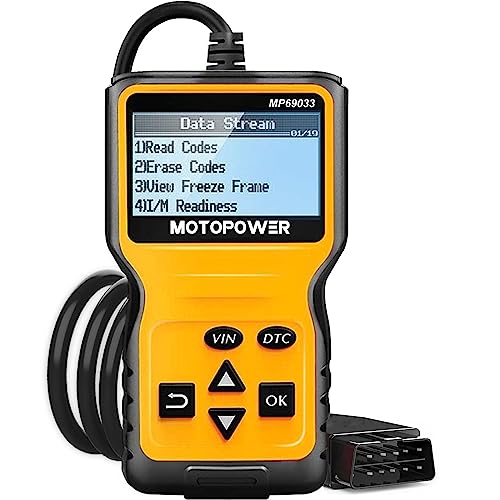
If you’re not a professional mechanic and need a relearn scanner, then this MOTOPOWER is the cheapest tool.
This supports multifunction that can read the DTC library and diagnose your car’s issues.
It can read code, erase code, view freeze frame, I/M ready data, calculate engine load, etc.
Pros
- It’s the cheapest scanner with TPMS relearn.
- It’s a compact scanner that diagnoses all your DTC codes.
- It supports six languages.
- It works with all OBD2-supported vehicles.
- You can do TPMS relearn.
Cons
- The display quality is not great.
3. VXDAS TPMS Relearn Tool
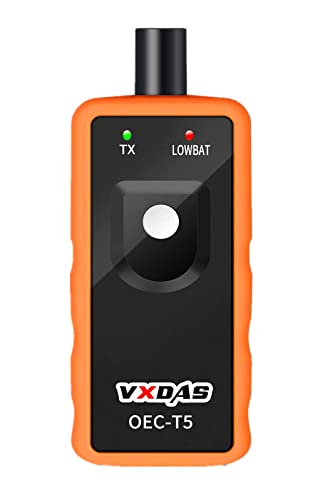
VXDAS is another budget-friendly TPMS relearn tool that works oat315 MHz and 433 MHz frequencies
This relearn tool works on all General Motors (GM) cars. If you have repaired your tire, then you need to replace the TPMS sensors too.
With the help of this relearn tool, you can easily program your TPMS sensors with a car computer.
Pros
- It works with all General Motors cars.
- It’s an affordable TPMS relearn tool.
- It’s an easy-to-use tool.
Cons
- It’s not compatible with all vehicle makes.
4. LAUNCH Elite OBD2 Code Reader

If you’re looking for an OBD2 scanner with relearn for DIY work, this Launch Elite is a great tool.
The new Elite 2022 model supports all the basic scanning features that diagnose your vehicle to determine which sensor is triggered by the malfunctioning indicator lamp.
It has 16 common maintenance reset service that includes Oil reset, IMMO, SAS, TPMS, DPF, Battery reset, etc.
Pros
- It’s a budget-friendly obd2 scanner with TPMS relearn and16 other service rest functionalities.
- It supports a one-click screenshots.
- It’s auto VIN feature detects vehicle make, model, and launch year.
- Its 4-inch touchscreen display shows live data.
- It receives free lifetime software update.
Cons
- It’s auto VIN feature doesn’t work on all car makes.
5. MUCAR CDL20 Trouble Code Reader with Relearn

MUCAR CDL20 is a cheap obd2 scanner with relearn functionality. If you’re looking for a basic scanner that offers TPMS relearn functionality for a very affordable price, then go for this.
It offers ten full obd2 code reading and reset features, including TPMS relearn, oil reset, O2 sensor reset, I/M readiness, Onboard monitor test, freeze frame, etc.
When it comes to vehicle compatibility, this tool works with all cars and SUV trucks made and sold after 1996 in the USA and 2000 EU-based Asian cars.
Pros
- It’s a cheap yet feature-rich obd2 scan tool.
- It supports all OBD-II and E-OBD cars.
- It provides ten basic services reset functions.
- It’s easy to use the device.
Cons
- Durability and after-sale service are a concern.
6. Autel MaxiTPMS TS601 TPMS Relearn Tool

Autel is a leading brand of car scanning tools, and this MaxiTPMS model is a popular choice for professionals.
Autel MaxiTPMS TS601 supports many data stream functions, which can observe the dynamic changes of data to help solve difficult problems.
It provides full TPMS diagnosis that supports TPMS sensor ID reading and writing to vehicle ECU.
It also supports TPMS Live data, including tire pressure, signal status, temperature, battery status, reset malfunction indicator light, etc.
Pros
- A powerful TPMS tool for all vehicles.
- It supports full TPMS read/write functionalities.
- It’s a great tool for advanced diagnosis of TPMS sensors and fixing problems.
- It supports ECU reprogramming.
- Its ergonomic design doesn’t impart fatigue for full-day use.
Cons
- It’s expensive.
7. XTOOL TP150 TPMS Programming Tool

The XTOOL TP150 TPMS Programming Tool is a versatile TPMS service device that goes beyond simple sensor triggering. It helps you activate, read, relearn, reset, and even program tire pressure monitoring system sensors on most vehicles.
It is ideal for DIYers and professional users who want a reliable, all-in-one TPMS solution without paying workshop rates.
This handheld unit supports both 315 MHz and 433 MHz TPMS sensors, giving it broad coverage across American, Asian, and European makes and models.
It displays real-time sensor data such as sensor ID, tyre pressure, temperature, battery status and frequency, and guides you through the necessary relearn process after sensor replacement or wheel rotation
Pros
- It has a full suite of TPMS services: activate, read, relearn, reset, read/clear codes and more.
- It works with most OEM and aftermarket TPMS sensors (315 MHz & 433 MHz).
- Offers multiple sensor programming methods for XTOOL sensors (Auto ID, manual input, copy via activation, copy via OBD).
- It retrieves real-time sensor information (ID, pressure, temperature, battery condition).
- It has lifetime software updates and included tech support.
Cons
- The programming functions only work with XTOOL’s own TS100 sensors (not included).
- It is not a full OBD2 diagnostic scan tool, it is focused specifically on TPMS.
- Be aware that some advanced features may vary by vehicle make/model.
- It is expensive.
8. Arozk TPMS Relearn Tool

If you have a General Motors vehicle such as Chevy, Buick, GMC, Opel, Cadillac, etc., then Arozk is the best TPMS relearn tool. It provides an easy TPMS relearn facility for GM cars and trucks.
This tool is easy to use, and you can individually reset your TPMS sensors by pressing just one button.
It supports 315Mhz and 433Mhz signals and activates your TPMS sensors easily.
Pros
- Easy to use relearn tool for GM.
- It supports other car makes as well.
- You can individually reset your TPMS sensors.
- It’s a budget-friendly tool.
Cons
- Limited features.
- Doesn’t support all car make and models.
Conclusion
You need to copy the sensor ID to ECU when replacing your TPMS sensors. This can be done with a TPMS relearn tool.
If you’re a professional mechanic, you can use an expensive tool like Autel MaxiTPMS, which offers advanced features. Else, a budget-friendly tool like Launch CRT5011E is good for DIY.